
Download WS Player APK – Multimedia Video Player, VR Video, Offline Viewing, DRM Technology, Android App
Overview
WS Player is a multimedia video player application designed for Android devices, offering users the ability to download and stream both conventional and 360° VR videos. Developed by 株式会社ウェブストリーム, the app is positioned as a tool for accessing video content from supported websites, with a focus on offline viewing and playback of encrypted material. The software enables users to save videos to a personal library for later access, providing flexibility for on-the-go entertainment. It supports playback of DRM-protected content, requiring license authentication for initial access, which ensures content security and compliance with copyright protocols.
Target users include consumers interested in watching high-quality video content, particularly those who value offline access and immersive 360° VR experiences. The app is particularly suited for individuals who frequently download videos from online sources and wish to manage them efficiently. Real-world usage scenarios include watching downloaded videos during travel, in low-connectivity areas, or while conserving mobile data. The application integrates seamlessly with download links, launching automatically when a compatible link is tapped, streamlining the user experience.
Key Features & Capabilities
- Multi-format Video Support – WS Player handles both standard video formats and 360° VR content, allowing users to enjoy immersive viewing experiences on supported devices.
- Offline Viewing – Videos can be downloaded and stored locally, enabling playback without an internet connection, ideal for travel or areas with limited connectivity.
- DRM-Protected Playback – The app uses Digital Rights Management technology to securely play copyrighted content, ensuring compliance with licensing agreements.
- Download Management – Users can resume interrupted downloads and manage their video library through a dedicated interface.
- Library Organization – Content can be sorted and accessed via a built-in library menu, improving navigation and content discovery.
- Customizable Settings – The app includes a settings menu where users can adjust playback preferences, download options, and other functional parameters.
These features collectively support a streamlined workflow for users who rely on downloading and managing video content. For example, a user can initiate a download from a supported website, return to the app later to resume playback, and customize video quality settings to suit their device’s capabilities. The integration of license authentication ensures that only authorized users can access protected content, aligning with content provider requirements.
User Interface, Workflow & Performance
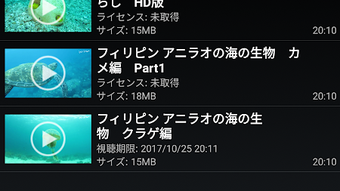
The user interface of WS Player is structured around a clean, functional layout optimized for mobile navigation. Core actions such as accessing the library, managing downloads, and adjusting settings are accessible through intuitive menus. The workflow begins with a download link activation, which triggers the app to open automatically, minimizing user steps. Once inside, users can view their downloaded videos, resume playback, or initiate new downloads.
Navigation is designed for simplicity, with a focus on reducing friction during content access. The app’s performance is expected to be stable on devices meeting the recommended specifications, though exact resource usage details were not specified. The developer did not provide information on CPU or RAM behavior during playback. General software behavior suggests efficient operation on modern Android devices, particularly those with a 2.3GHz quad-core processor and 2GB RAM. Stability is assumed to be adequate for typical usage, but no benchmark data was provided.
Compatibility & System Requirements
WS Player is compatible with Android OS 5 and above, making it accessible to a wide range of devices. The current version is 1.3.4, with a file size of 21.3MB, indicating a lightweight installation. The recommended hardware configuration includes a 2.3GHz quad-core CPU and 2GB of RAM, which suggests the app is optimized for mid-range to high-end Android smartphones and tablets.
Exact system requirements were not listed beyond the minimum OS version. Compatibility information was partially provided, leaving room for uncertainty regarding support for older or newer Android versions. Users are advised to verify device compatibility before installation. The app is available for free download on Google Play and other platforms, ensuring broad accessibility across the Android ecosystem.
Pros and Cons
Pros
- Supports both standard and 360° VR video playback
- Enables offline viewing of downloaded content
- Secure playback via DRM technology
- Resumes interrupted downloads for improved reliability
- Customizable settings and library management
- Lightweight installation at 21.3MB
Cons
- DRM authentication required for initial playback
- Compatibility limited to Android 5 and above
- Exact performance metrics not disclosed
- Dependent on external websites for content sourcing
- No information on cloud sync or cross-device access
FAQ Section
Is WS Player available for free?
Yes, WS Player is available for free download on Google Play and other platforms.
Can I use WS Player on devices with Android OS below 5?
The app requires Android OS 5 or higher. Devices running older versions may not be compatible.
Does WS Player support 360° VR videos?
Yes, WS Player supports playback of 360° VR videos, allowing for immersive viewing experiences on compatible devices.
Is the app secure for downloading and playing copyrighted content?
WS Player uses DRM technology to ensure secure playback of copyrighted material, requiring license authentication for access.
Can I update WS Player manually?
Updates are typically distributed through official app stores like Google Play. Manual updates may be possible via APK files from trusted sources.
Final Thoughts
WS Player stands out as a capable multimedia tool for Android users seeking to download, manage, and play both standard and 360° VR videos offline. Its integration of DRM protection ensures secure playback of copyrighted content, while features like download resumption and customizable settings enhance usability. The app’s lightweight design and broad Android compatibility make it accessible to a wide audience.
While some details such as performance behavior and cross-device functionality remain unspecified, the app delivers a focused and reliable experience for its intended use case. It is particularly beneficial for consumers who frequently download video content and value offline access. For users seeking a secure, lightweight, and feature-rich video player with VR support, WS Player offers a compelling solution.
Download WS Player now






.png)
